
In the fast-paced U.S. real estate market of 2026, managing listings effectively is just as crucial as acquiring them. For agents juggling multiple properties, client communications, and marketing channels, a centralized hub is no longer a luxury—it is a necessity.
This guide explores the Property Center, a specialized tool designed to streamline the chaotic workflow of listing management and marketing asset creation. Whether you are a solo agent or part of a large brokerage, understanding how to leverage this free utility can significantly reduce administrative overhead and improve your listing's speed-to-market.
What is the Property Center?
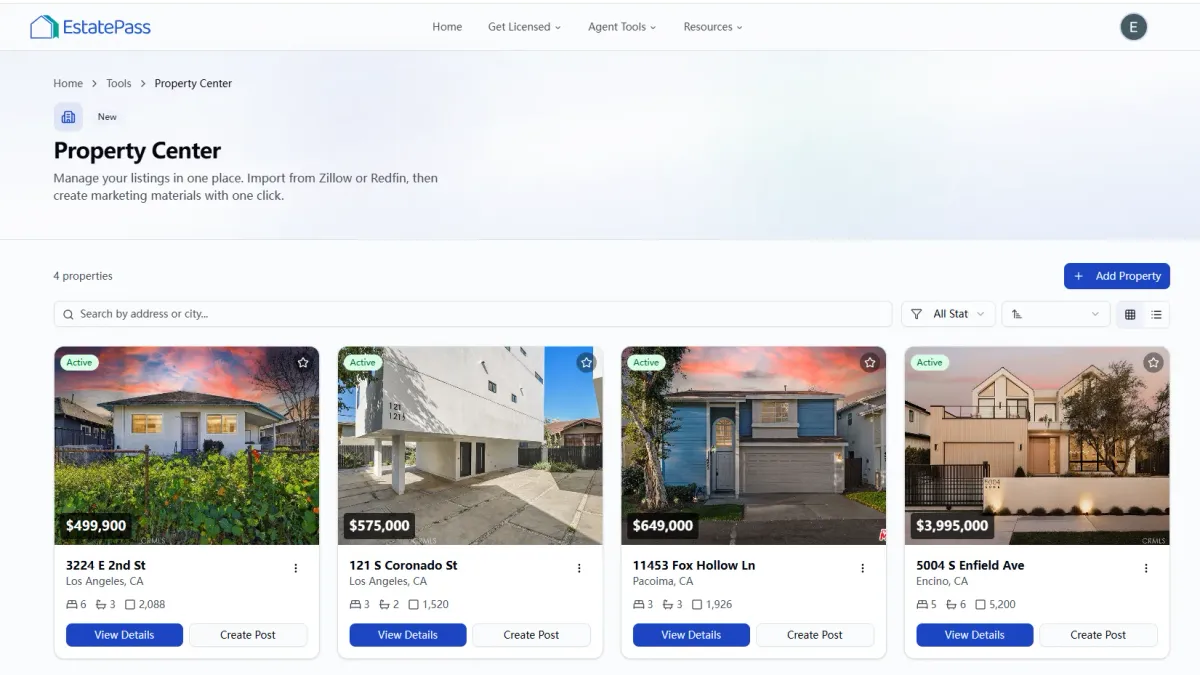
The Property Center is a comprehensive digital workspace designed for U.S. real estate agents to centralize, manage, and distribute property listing information. It serves the specific "job-to-be-done" of taking raw property data—such as photos, descriptions, and specs—and converting them into polished marketing assets and organized records ready for client presentation.
Who is it for?
Listing Agents: Who need to quickly generate flyers, social media posts, and single-property sites.
Transaction Coordinators: Who need a central repository for listing details to ensure accuracy across documents.
New Agents: Who require professional-grade marketing tools without the high overhead costs of premium SaaS subscriptions.
Integration Capabilities: Does it sync with your local MLS or allow for easy data import? Manual entry should be minimized.
Customization: Can you apply your personal branding (colors, logos, headshots) to the generated materials?
Speed & Automation: How quickly can you go from "Just Listed" to having a full marketing suite ready?
Mobile Usability: Is the platform accessible on a tablet or smartphone for on-the-go edits during open houses?
Compliance Features: Does the tool prompt for Fair Housing disclaimers or state-required brokerage disclosures?
Cost Efficiency: Is the pricing transparent? (Note: The tool reviewed here is free).
Output Quality: Do the generated brochures and social graphics look professional and high-resolution?
Centralized Asset Management: Upload your high-resolution photography once and use it across multiple formats (social posts, print flyers, email headers).
Automated Marketing Generation: The tool uses your listing data to automatically populate templates, saving hours of design time.
Workflow Organization: It helps track the status of your listings, from "Coming Soon" to "Sold," keeping your digital presence synchronized with reality.
Property Details: Address, price, square footage, bed/bath count.
Visuals: High-quality exterior and interior photos (the system relies on these for marketing generation).
Agent Branding: Your headshot, brokerage logo, and license number for compliance footer placement.
Create Your Profile:
Sign up and input your agent profile details. Ensure your license number and brokerage information are accurate for legal compliance on generated assets.
Add a New Property:
Click "Add Listing" and enter the property address.
Input the core specs (Price, Beds, Baths, Sq Ft, Year Built).
Pro Tip: Add a compelling property description early, as this will be used for your flyers and social captions.
Upload Media:
Drag and drop your professional listing photos. Arrange them in the order you want them to appear in a slideshow or brochure (e.g., Hero shot first, then living room, kitchen, primary suite).
Generate Assets:
Navigate to the "Marketing" tab within the property dashboard.
Select the assets you need (e.g., "Open House Flyer," "Instagram Story," "Facebook Post").
The tool will auto-populate these templates with your photos and text.
Review and Download:
Check for any typos or photo cropping issues.
Download the files for print or share them directly to your digital channels.
Spreadsheets (Excel/Google Sheets):
Pros: infinitely customizable and free.
Cons: No visual management, no automation for marketing materials, and high risk of manual data entry errors.
General Graphic Design Tools (e.g., Canva):
Pros: High creative freedom.
Cons: Requires manual copy-pasting of property details for every single design; time-consuming to maintain consistency across multiple assets.
Paid All-in-One CRM/Marketing Suites:
Pros: often include email drip campaigns and lead routing.
Cons: Can cost hundreds of dollars per month and often have steep learning curves with features you may never use.
MLS Portals:
Pros: The source of truth for data.
Cons: Marketing capabilities are usually very limited or outdated visually.
Front-Load Your Work: Spend extra time writing a perfect description and curating your photos before uploading. This ensures every generated asset is polished from the start.
Update Statuses Promptly: When a property goes "Pending," update it in the Property Center immediately so your generated social posts reflect the momentum.
High-Res Only: Always use the highest resolution photos available. Blurry images on auto-generated flyers kill credibility.
Ignoring Compliance Fields: Leaving out your DRE/license number or brokerage logo. Always double-check that these appear on your generated materials.
Inconsistent Data: Having a different price on your flyer vs. your MLS listing. Using a central tool helps prevent this, but only if you update the central tool first.
Over-reliance on Default Text: While AI descriptions are good, always review them to ensure they capture the emotional "hook" of the home.
Buyer’s Checklist: Evaluating Real Estate Marketing Tools
Before committing to a new tool in your tech stack, it is essential to evaluate it against key performance criteria. Use this checklist when assessing listing management software in 2026:

Why EstatePass Property Center?
EstatePass Property Center is built to be the command center for your listings. Unlike fragmented tools where you might use one app for flyers and another for tracking open house visitors, EstatePass aims to unify these functions.
Core Capabilities
Inputs Required
To get the most out of the Property Center, you will typically need:
Who It Fits Best
This tool is particularly valuable for independent agents and boutique brokerages that want to maintain a high standard of marketing without employing a dedicated marketing coordinator. It is also excellent for high-volume teams that need a standardized look for every listing.

How to Use It: A Step-by-Step Walkthrough
Getting started with the EstatePass Property Center is designed to be intuitive. Follow these steps to set up your first property:

Alternatives to Dedicated Property Centers
While EstatePass Property Center offers a specialized solution, agents often use other methods to manage listings. Here is how they compare:
Best Practices & Common Mistakes
Best Practices
Common Mistakes

FAQ: Property Center Essentials
1. Is the EstatePass Property Center really free?
Yes, the core functionalities of the Property Center are designed to be a free utility for agents to manage their listings and generate marketing materials.
2. Can I use this for rental properties?
Absolutely. The fields for price and terms are flexible enough to accommodate leases as well as sales.
3. Does it replace my MLS?
No. You must still input your listing into your local MLS to syndicate to major portals (Zillow, Realtor.com). The Property Center is for your internal management and marketing creation.
4. How secure is my data?
EstatePass utilizes standard encryption to protect your account details and client property data.
5. Can I upload video tours?
Most property centers focus on static images for flyer generation, but you can often include links to video tours (like Matterport or YouTube) in the description fields.
6. What file formats are the downloads?
Marketing assets are typically available as PDFs for print and JPG/PNGs for social media.
7. Can I add team members?
Check the specific account settings. Many tools allow for basic collaboration, or you can share login credentials with a trusted assistant (ensure you follow your brokerage's security protocols).
8. How do I edit a flyer after generating it?
You usually edit the source data (the listing details) and then regenerate the flyer. Some advanced modes may allow direct text editing on the canvas.
9. Is there a limit to how many listings I can add?
Free tools sometimes have limits, but EstatePass is designed to scale with your active inventory.
10. Does it work on mobile?
Yes, the platform is optimized for mobile browsers, allowing you to tweak a listing price or download a social graphic from your car.
Compliance Note & Disclaimer
Compliance Note:
Real estate advertising is heavily regulated in the United States. Ensure all materials generated via the Property Center comply with the Fair Housing Act (avoiding discriminatory language) and your state’s specific real estate commission advertising rules (e.g., font size of brokerage name vs. agent name). Always verify that your license number and required disclosures are visible.
Disclaimer:
This guide is for informational purposes only and does not constitute legal, financial, or professional advice. Tool features and availability are subject to change. Always verify current regulations with your employing broker and local real estate board.
Ready to streamline your listing workflow?
Simplify your marketing and manage your properties with ease.
Try the EstatePass Property Center today.