
In the high-velocity real estate market of 2026, speed and narrative quality are the twin pillars of a successful listing launch. With buyers spending 60% of their time on photos but relying on the description for the "story" of the home, the pressure to write compelling copy is higher than ever.
For many U.S. agents, staring at a blank screen trying to describe a standard 3-bedroom ranch is a major time sink. This is where AI-powered tools come in. This guide explores how listing description generators work, how to evaluate them, and how to use them effectively to boost your brand and streamline your workflow.
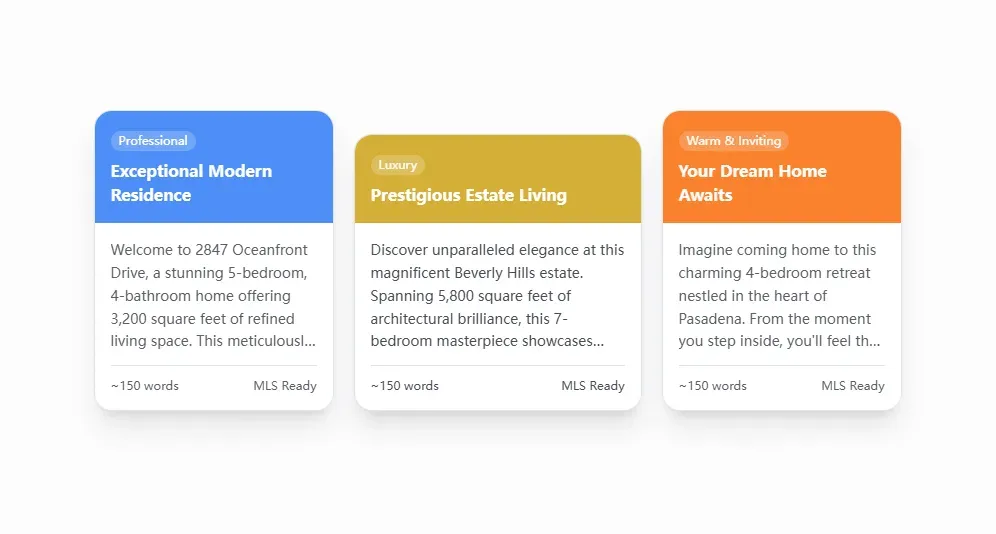
What is a Listing Description Generator?
A Listing Description Generator is an AI-powered software tool designed specifically for real estate professionals. Its primary "Job-to-be-Done" is to instantly transform raw property data (square footage, amenities, bed/bath count) into an engaging, cohesive narrative suitable for the MLS, social media, and marketing brochures.
Who is this for?
Busy Real Estate Agents: Agents juggling multiple listings who need to save hours on copywriting.
Property Managers: Professionals needing consistent, clear descriptions for rental units.
Real Estate Teams: Groups looking to maintain a unified brand voice across all agent listings without hiring a full-time copywriter.
Accuracy & Hallucination Control: Does the tool stick to the facts provided, or does it invent features (like a pool that doesn't exist)?
Customization (Tone & Style): Can you adjust the voice? A luxury waterfront estate requires a different tone (sophisticated, serene) than a downtown fixer-upper (investment opportunity, potential).
Compliance Safety: Does the tool have built-in guardrails to help avoid violations of the Fair Housing Act (e.g., avoiding terms like "bachelor pad" or "perfect for families")?
Speed & Workflow: How fast is the generation? Can you copy-paste instantly?
Mobile Usability: Can you generate a description from your phone while standing in the living room during a listing appointment?
SEO Capabilities: Does it naturally integrate keywords that buyers are searching for in 2026 (e.g., "home office," "EV charging," "smart home")?
Cost: Is it a free tool, a freemium model, or a monthly subscription?
Property Type: (e.g., Single Family, Condo, Multi-family).
Key Features: (e.g., Renovated kitchen, hardwood floors, proximity to schools/transit).
Location/Vibe: (e.g., Quiet cul-de-sac, vibrant downtown).
Desired Tone: (e.g., Professional, Urgent, Luxury, Warm).
Gather Your Data: Have your basic property specs ready (Beds, Baths, Sq Ft, Upgrades).
Access the Tool: Navigate to the EstatePass Listing Description Generator.
Input Property Details: Enter the address and select the property type.
Highlight Key Features: Enter the top 3-5 selling points. Tip: Be specific. Instead of "good kitchen," write "quartz countertops and Viking appliances."
Select Tone: Choose the emotion you want to convey (e.g., "Luxury" for high-end, "Cozy" for starter homes).
Generate: Click the button to create the draft.
Review and Refine: Read through the text. Add local neighborhood nuances that only a human expert would know.
General AI Chatbots: Large Language Models (LLMs) are powerful but require "prompt engineering." You must write detailed instructions every time to get the right format, whereas specialized tools have these prompts pre-built.
Paid Real Estate SaaS Suites: Comprehensive CRM platforms often include AI writers. These are effective but usually come with high monthly subscription fees and may be "overkill" if you just need a description.
In-App MLS Tools: Some Multiple Listing Services have basic auto-text features. However, these often result in robotic, formulaic descriptions that lack emotional hooks.
Manual Templates & Spreadsheets: The traditional "Mad Libs" style templates. These are free but time-consuming and can result in repetitive, stale listing copy across your inventory.
Focus on the "Hook": Ensure the first sentence grabs attention. If the AI buries the lead, move the best feature to the top.
Edit for "Vibe": AI can describe a house, but you know the neighborhood. Add details about the local coffee shop or the community spirit.
Use Specific Data: Replace vague adjectives with hard facts. Change "spacious backyard" to "0.5-acre flat lot."
Optimize for SEO: Ensure the description includes keywords relevant to your local market trends in 2026.
Posting Raw AI Text: Never copy-paste without reading. AI can occasionally hallucinate features or use repetitive phrasing.
Ignoring Fair Housing: AI is getting smarter, but it is not a lawyer. Always review the text for potential Fair Housing violations (e.g., steering language).
Over-Exaggeration: Avoid letting the AI use hyperbolic words like "breathtaking" or "world-class" if the property is a standard starter home. It sets unrealistic expectations.
Formatting Walls of Text: Don't paste one giant paragraph. Break the text up for readability on mobile devices.
Buyer’s Checklist: How to Evaluate a Generator
Not all AI tools are created equal. As we move through 2026, agents should evaluate tools based on the following criteria to ensure they meet the specific demands of the U.S. housing market.
Why EstatePass Listing Description Generator?
The EstatePass Listing Description Generator is designed to be a frictionless, high-utility tool for agents who need professional results without a steep learning curve or subscription fatigue.
What it does:
It utilizes advanced language models to craft property descriptions that balance emotional appeal with data accuracy. It bridges the gap between dry data fields and the lifestyle "dream" buyers are looking for.
Inputs Required:
To get the best result, the tool typically requires:
Who it fits best:
EstatePass is ideal for residential agents in the U.S. who want a free, reliable, and instant solution to writer's block. It is particularly useful for agents who want to ensure their descriptions are polished and grammatically perfect before hitting "Submit" on the MLS.

How to Use It: A Step-by-Step Walkthrough
Using the tool is straightforward. Follow this workflow to generate a listing description in under two minutes:
Alternatives to Specialized Generators
If you are exploring the landscape of copywriting tools, here are the general categories of alternatives available in 2026:
Best Practices and Common Mistakes
To get the most out of an AI generator, combine the technology with your real estate expertise.
Best Practices
Common Mistakes to Avoid

FAQ: Listing Description Generators
1. Is the EstatePass Listing Description Generator really free?
Yes, it is designed as a free utility for real estate professionals to streamline their marketing workflow.
2. Will using AI hurt my SEO?
No, provided the content is relevant and helpful. In fact, AI can help ensure you include high-ranking keywords that you might otherwise forget.
3. Can I use the generated text for social media?
Absolutely. You can take the MLS description and ask the tool (or edit it manually) to shorten it for Instagram captions or Facebook posts.
4. How do I ensure Fair Housing compliance?
While tools like EstatePass are built with best practices in mind, you are ultimately responsible. Always avoid phrases referencing race, religion, gender, family status, or disability.
5. Does this replace a professional copywriter?
For standard listings, it is often sufficient. For ultra-luxury, multi-million dollar estates, a human storyteller or copywriter is still often recommended for that bespoke touch.
6. What if the generated description has an error?
AI tools generate text based on patterns. If it says there is a "gas fireplace" when it is electric, simply edit the text before publishing. You are the editor-in-chief.
7. Can it handle fixer-uppers?
Yes. By selecting a tone like "Investment Potential" or "Opportunity," the AI will frame the condition of the home as a positive project rather than a negative.
8. How long should a listing description be?
For the MLS, usually between 500 to 1,000 characters is standard, depending on your local board's limits. The generator typically targets this sweet spot.
9. Do I need to sign up to use it?
Many free tools allow instant access, though some may require a simple email sign-up to save your history.
10. Why is my description sounding repetitive?
If you use the exact same input prompts for every house, the output will sound similar. Vary your input adjectives to get unique results.
Compliance Note & Disclaimer
Fair Housing Compliance: Real estate agents must adhere strictly to the Federal Fair Housing Act and local state laws. When using any automated text generator, carefully review the output to ensure it does not contain discriminatory language regarding race, color, religion, sex, handicap, familial status, or national origin. Avoid phrases like "perfect for couples," "walking distance to [Place of Worship]," or "safe neighborhood" (which can be interpreted as steering). Focus on the physical attributes of the property and the amenities of the location.
Disclaimer: This article is for informational purposes only and does not constitute legal, financial, or professional advice. Real estate laws and platform algorithms change frequently. Always verify your marketing materials with your broker or legal counsel before publication.
Ready to write your next listing in seconds?
Stop staring at the cursor and start selling. Try the free tool today:
EstatePass Listing Description Generator