
In the fast-paced 2026 real estate market, video is no longer optional—it is the primary driver of engagement. A Real Estate Video Script Generator is a specialized tool designed to automatically draft compelling spoken content for property tours, agent introductions, and market updates. It is built specifically for U.S. real estate agents who need to turn dry MLS data into engaging narratives for social media and listing presentations without spending hours staring at a blank page.
Evaluation Criteria: A Buyer’s Checklist
Before choosing a script generation tool, agents should evaluate the software against these key performance indicators to ensure it meets the demands of the modern market:
Platform Optimization: Does it generate distinct scripts for short-form (TikTok/Reels/Shorts) versus long-form (YouTube/Website) video?
Tone Customization: Can you toggle between professional, luxury, energetic, or conversational tones to match your personal brand?
Input Efficiency: How quickly can it process property details (beds, baths, square footage, amenities)?
Accuracy & Hallucination Control: Does the AI stick strictly to the facts provided, or does it invent features (a major liability risk)?
Mobile Usability: Is the interface mobile-responsive for on-the-go script generation at a listing?
Cost Structure: Is it truly free, or is it a "freemium" model with watermarks and paywalls?
Speed: Does it produce a usable draft in under 30 seconds?
What it does: It instantly transforms raw listing data into polished, ready-to-read scripts tailored for specific video formats (like a 60-second property tour or a 15-second teaser).
Required Inputs: You simply need basic property details (address, price, bed/bath count) and key selling points (e.g., "chef’s kitchen," "hardwood floors," "close to schools").
Who it fits best: This tool is ideal for residential agents, listing coordinators, and social media managers who need to produce high volumes of consistent video content across Instagram, TikTok, and YouTube without hiring a copywriter.
Access the Tool: Navigate to the EstatePass Video Script Generator.
Input Property Details: Enter the core stats (beds, baths, sq ft) and the property address.
Select Highlights: Choose or type in 3–5 unique features you want to emphasize (e.g., "new roof," "pool," "open concept").
Choose Format/Tone: Select your target platform (e.g., "Instagram Reel") and desired vibe (e.g., "Luxury" or "Friendly").
Generate & Refine: Click generate. Review the output, tweak any phrasing to sound more like you, and load it into your teleprompter app or memorize the key points.
General AI Chatbots (LLMs):
Pros: Versatile and often free.
Cons: Requires detailed "prompt engineering" to stop it from sounding robotic or overly salesy. It often lacks knowledge of specific real estate terminology unless trained.
Spreadsheets & Word Templates:
Pros: Total control and zero cost.
Cons: Extremely time-consuming. You must manually rewrite the same structure for every new listing, which kills productivity.
Paid Video Marketing SaaS:
Pros: Some all-in-one platforms include scriptwriting, recording, and editing in one app.
Cons: High monthly subscription fees. The script quality is often secondary to the video editing features.
In-App Social Media Features:
Pros: Convenient when already inside an app like Instagram.
Cons: These platforms do not generate scripts; they only offer captions after you record. You still have to come up with what to say.
The "3-Second Rule": Ensure the script generator puts the "hook" (the most exciting feature or a question) in the very first sentence.
Humanize the Output: Always read the script aloud before recording. If a phrase twists your tongue, change it.
Call to Action (CTA): Every script must end with a clear next step (e.g., "DM me for a private tour" or "Link in bio for price").
Batch Creation: Generate scripts for all your active listings at the start of the week to streamline your filming schedule.
Reading Verbatim: Don't sound like a robot. Use the script as a structured guide, not a rigid law.
Ignoring Compliance: Never let an AI invent facts. If the script says "brand new appliances" but you didn't input that, delete it.
Overloading Information: listing every single room in a 60-second video is boring. Focus on the feeling of the home and top 3 features.
Neglecting Captions: 2026 data suggests many users watch video without sound. Ensure your script is also used to generate accurate captions.
Why EstatePass Video Script Generator?
The EstatePass Video Script Generator is designed to solve the "writer's block" problem that plagues busy agents. Unlike general AI chatbots that require complex prompting to understand real estate nuances, EstatePass is pre-engineered for the property market.
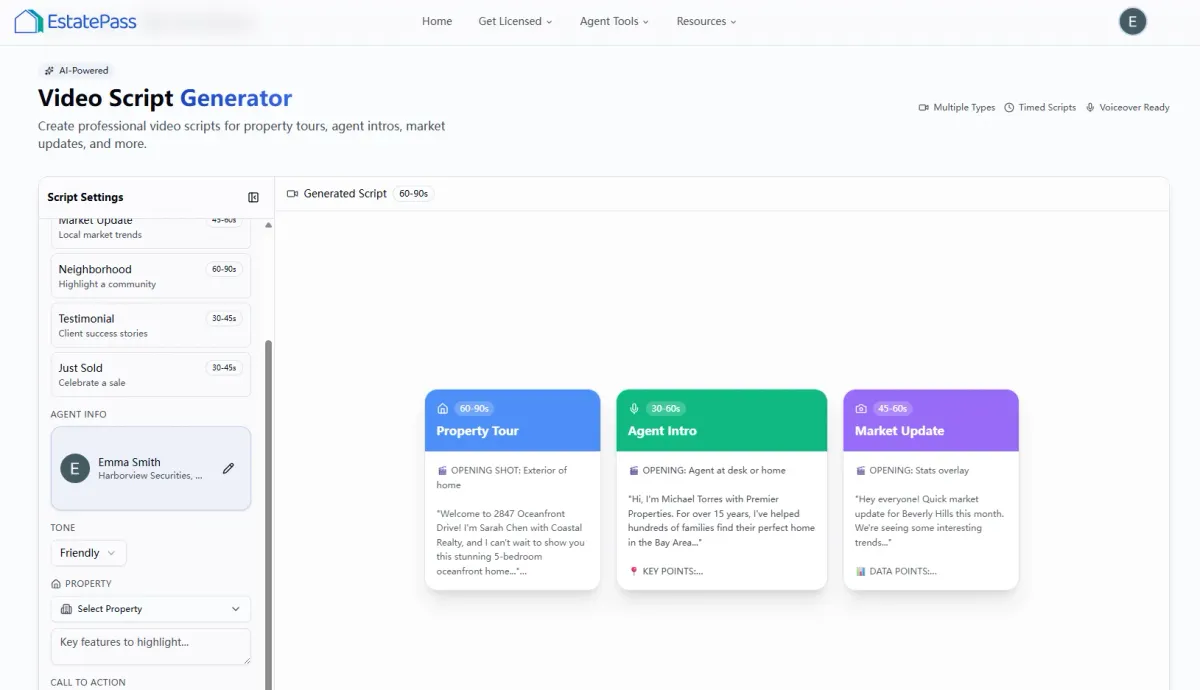
How to Use It: A Quick Walkthrough
Using the tool is a straightforward process designed to get you recording in minutes:
Alternatives to Dedicated Script Generators
While EstatePass offers a specialized solution, agents often explore other methods. Here is how they compare:

Best Practices & Common Mistakes
Best Practices:
Common Mistakes:

FAQ: Real Estate Video Scripts
1. Is the EstatePass Video Script Generator truly free?
Yes, the tool is designed to be a free resource for agents to enhance their marketing workflow without subscription barriers.
2. Can I use these scripts for YouTube Shorts and TikTok?
Absolutely. The generator is optimized to create concise, punchy scripts that fit the time constraints of short-form vertical video.
3. Do I need to credit the AI when I post the video?
No. The output is yours to use. You do not need to disclose that a script generator helped write your lines.
4. Can this tool write an "About Me" agent bio script?
Yes. While optimized for listings, you can input your personal experience and unique value proposition to generate an agent introduction script.
5. How do I transfer the script to my phone?
Most agents copy the text and paste it into a notes app, an email to themselves, or directly into a teleprompter app on their mobile device.
6. Will the scripts help with SEO?
Indirectly, yes. Using the generated script as your video description or caption (with slight modifications) can help search algorithms understand your video content.
7. What if the script is too long?
Most generators allow you to specify length, but you can always cut the least important bullet point. For short-form video, aim for 120–150 words per minute of speaking time.
8. Does it work for commercial real estate?
The logic remains the same, though you may need to manually adjust terminology (changing "bedrooms" to "offices" or "living space" to "retail floor").
9. Can I save my generated scripts?
This depends on the platform's features, but it is best practice to copy your scripts into a dedicated document or project management tool immediately after generation.
10. How often should I post video content?
In 2026, consistency is key. Aim for at least 2–3 short-form videos per week. Using a script generator makes this volume manageable.
Compliance & Disclaimer
Compliance Note:
Real estate agents in the U.S. must adhere to Fair Housing Laws and the Code of Ethics. Ensure your video scripts do not contain discriminatory language regarding race, color, religion, sex, handicap, familial status, or national origin. Additionally, all advertising must present a "true picture" of the property. Verify all data points (square footage, school districts, upgrades) generated by any AI tool against official MLS records before publishing.
Disclaimer:
This guide is for informational purposes only and does not constitute legal, financial, or professional advice. Tool features and availability are subject to change. Always verify marketing materials with your managing broker to ensure compliance with state and local advertising regulations.
Ready to streamline your content creation?
Try the EstatePass Video Script Generator today and start filming professional property tours in minutes.
