
For U.S. real estate agents, the "job-to-be-done" of a social media post generator is to instantly transform raw listing data, market stats, or generic ideas into engaging, compliant, and platform-specific content (captions, hashtags, and formatting) without the need for a copywriter. It is designed for residential real estate professionals who need to maintain a consistent online presence on platforms like Instagram, Facebook, and LinkedIn but lack the time to draft creative copy from scratch every day.
Buyer’s Checklist: Evaluating Social Media Tools
Before selecting a tool for your real estate marketing stack, evaluate it against these critical criteria to ensure it meets the specific demands of the 2026 housing market.
Accuracy & Context: Does the AI understand U.S. real estate terminology (e.g., "turnkey," "escrow," "CMA")?
Customization: Can you adjust the tone (professional, witty, urgent) to match your agent branding?
Compliance Safety: Does the tool have built-in guardrails or reminders to help avoid Fair Housing violations?
Speed: Can it generate a full post (caption + hashtags) in under 30 seconds?
Platform Specificity: Does it differentiate between short-form Instagram captions and longer LinkedIn articles?
Mobile Usability: Is the interface mobile-friendly for generating posts while at an open house?
Cost: Is it a free tool, a freemium model, or a high-ticket monthly subscription?
Integrations: Does it allow for easy copying or direct posting to major networks?
Topic or Listing Details: Simply input the address, key features (e.g., "quartz countertops," "school district"), or the subject (e.g., "First-time homebuyer tips").
Desired Tone: Select a tone that fits your brand, such as "Luxury," "Friendly," or "Professional."
Platform: Specify if the content is for Instagram, Facebook, LinkedIn, or X (Twitter).
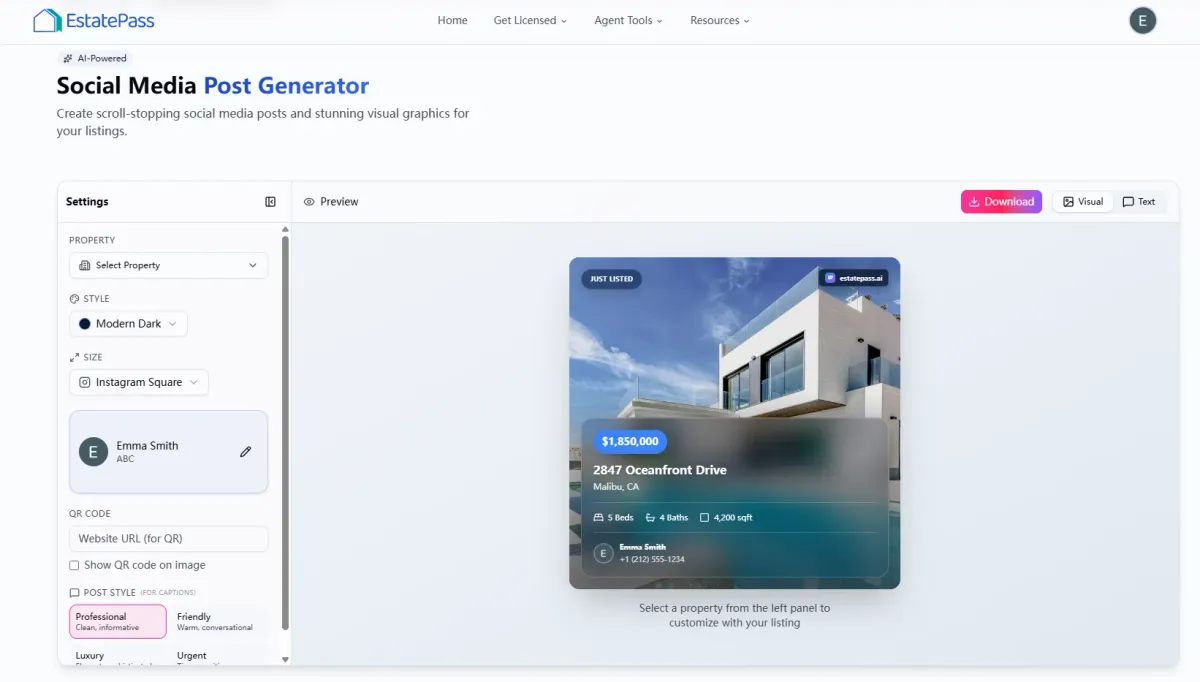
Access the Tool: Navigate to the EstatePass Social Media Post Generator.
Select Your Objective: Choose what you want to post about (e.g., "Just Listed," "Market Update," "Client Testimonial," or "Community Spotlight").
Enter Key Information: Type in the specific details. For a listing, include the bed/bath count, unique amenities, and neighborhood vibe.
Choose Your Vibe: Pick a tone. Use "Exciting" for a new listing or "Authoritative" for market analysis.
Generate: Click the button to create your draft.
Review and Refine: Read the output. The tool will provide a polished caption and a block of optimized hashtags.
Post: Copy the text, add your photo or video, and publish it to your social media profiles.
Generic AI Chatbots: Large Language Models (LLMs) can write copy but often require detailed "prompt engineering" to sound like a real estate expert and may hallucinate local market data.
Spreadsheet Templates: Many agents use static Excel or Google Sheets calendars with pre-written "fill-in-the-blank" templates. These are reliable but can feel repetitive and lack creativity.
In-App Social Features: Platforms like Instagram and TikTok have native caption tools, but they are generally limited in length and do not offer strategic marketing angles.
Paid Social Media Management SaaS: Comprehensive platforms (like Hootsuite or Buffer) often include AI writing assistants. These are powerful but usually come with a monthly subscription fee that might be unnecessary for agents who just need help with writing.
Freelance Copywriters: Hiring a human writer ensures high personalization but is the most expensive and slowest option compared to automated tools.
Visuals First: Always pair your generated text with high-quality photos or vertical video (Reels/Shorts). The caption supports the visual.
Localize Content: Add specific local neighborhood names or landmarks to the generated text to boost local SEO.
Engage Quickly: Reply to comments within the first hour of posting to signal relevance to the algorithm.
Use the 80/20 Rule: 80% of your posts should be value-driven (education, lifestyle, community), and only 20% should be hard sales (listings).
Ignoring Fair Housing: Never post content that indicates a preference or limitation based on race, color, religion, sex, handicap, familial status, or national origin. Always review AI output for bias.
Overusing Hashtags: Stuffing 30 generic hashtags looks spammy. Use a targeted mix of 5–15 relevant tags.
Posting Without Review: AI is a tool, not a pilot. Always read the generated text to ensure it sounds like you and verify facts.
Inconsistent Branding: Switching wildly between a formal corporate tone and casual slang can confuse your audience.

Why EstatePass Social Media Post Generator?
The EstatePass Social Media Post Generator is a specialized, free tool engineered to solve the "blank page problem" for busy agents. Unlike generic AI writers, it is fine-tuned for the real estate industry, helping agents effortlessly create listing marketing content and educational posts.
What it does:
It generates professional social media captions, selects relevant real estate hashtags, and structures posts for maximum engagement. It helps agents promote new listings, share open house details, or provide market updates without spending hours writing.
Inputs it needs:
Who it fits best:
This tool is ideal for solo agents, small teams, and marketing coordinators who need high-quality, free content quickly. It is particularly useful for agents who want to maintain consistency across multiple channels but do not have the budget for a full-time social media manager.
How to Use It: A Step-by-Step Walkthrough
Using the generator is straightforward and requires no technical expertise.

Alternatives to Specialized Generators
If you are exploring other ways to create content, here are the standard categories of alternatives available in the market:

Best Practices and Common Mistakes
To get the most out of your social media efforts in 2026, follow these industry standards.
Best Practices:
Common Mistakes:

FAQ: Real Estate Social Media Tools
1. Is the EstatePass Social Media Post Generator really free?
Yes, the tool is designed to be a free resource for agents to generate captions and post structures without a subscription.
2. Can I use the generated content for Facebook Ads?
Absolutely. The copy generated is effective for organic posts but can easily be adapted for paid advertising campaigns on Meta platforms.
3. How does this help with SEO?
By consistently using relevant keywords and hashtags associated with your local market (e.g., "Austin luxury homes"), you improve your discoverability on social search engines.
4. Does the tool create images?
This specific tool focuses on text generation (captions and hashtags). For visuals, you should use your listing photos or other design tools, though EstatePass may offer separate solutions for graphics.
5. How often should I post on social media?
In 2026, consistency beats frequency. Aim for 3–4 high-quality posts per week rather than posting low-quality content daily.
6. Can I use this for LinkedIn articles?
Yes, you can select a "Professional" tone to generate longer-form content suitable for LinkedIn networking.
7. Will the content sound robotic?
The tool is optimized for natural language. However, adding a personal sentence or emoji that reflects your unique personality is always recommended.
8. Do I need to credit the tool when I post?
No, the content you generate is yours to use. You do not need to attribute the text to the generator.
9. What if the AI suggests a Fair Housing violation?
While rare, AI can make mistakes. As the licensed professional, you are the final gatekeeper. Always edit out any language that could be construed as discriminatory.
10. Can I save my posts for later?
Most free generators are "session-based," meaning they don't store history. You should copy your results to a document or scheduler immediately.
11. Does it work for commercial real estate?
Yes, while optimized for residential, the inputs can be adjusted to describe commercial properties, focusing on cap rates and zoning rather than bedrooms and baths.
Compliance Note & Disclaimer
Compliance: Real estate advertising is strictly regulated. All social media posts must comply with the Fair Housing Act and your state's specific real estate advertising rules (e.g., displaying your brokerage name prominently). Ensure that any claims made in your posts (e.g., "sold in record time") can be substantiated.
Disclaimer: This guide is for informational purposes only and does not constitute legal, financial, or professional advice. Tools mentioned are subject to change. Always verify the output of any AI tool before publishing.
Ready to streamline your marketing?
Try the free EstatePass Social Media Post Generator today and start creating engaging content in seconds.