
In 2026, static images are no longer enough to stop the scroll. With the dominance of Instagram Reels, TikTok, and YouTube Shorts, U.S. real estate agents must pivot to video-first marketing. However, hiring professional videographers for every listing isn't scalable. Enter the AI-powered property video generator—a tool designed to turn standard MLS photos into engaging video content in seconds.
What is a Property Video Generator?
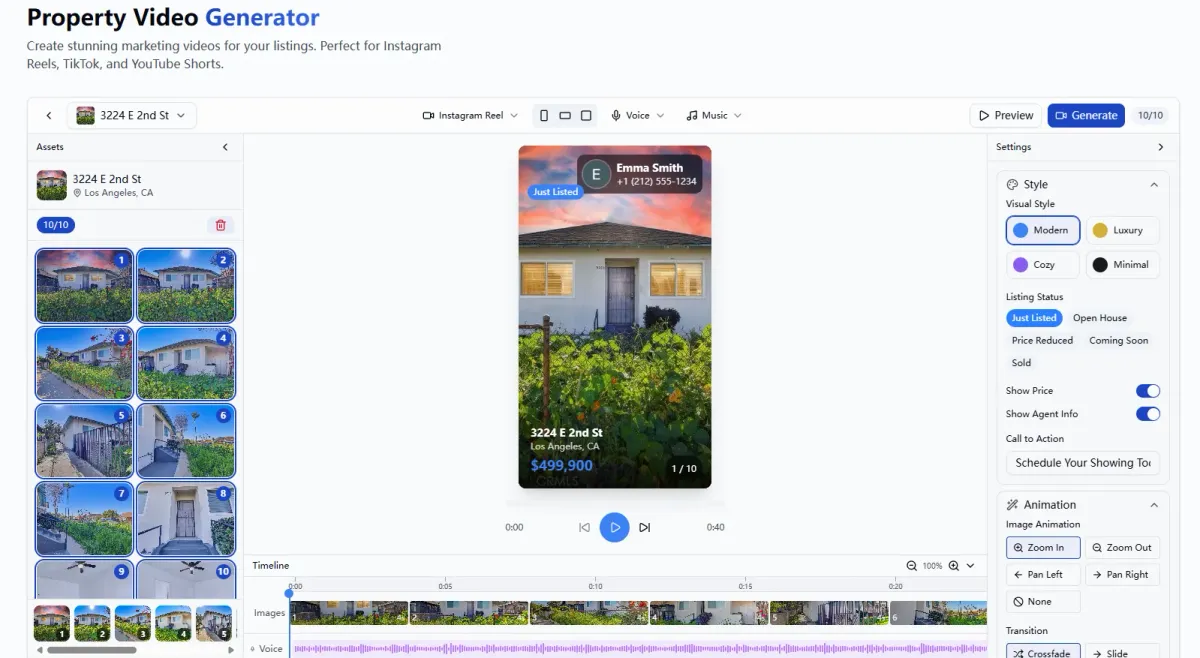
A Property Video Generator is a software tool, often powered by Artificial Intelligence (AI), that automatically stitches together static listing photos into dynamic video presentations. It adds transitions, background music, text overlays, and agent branding to create a polished marketing asset.
Who is this for?
This tool is designed for U.S. residential and commercial real estate agents who need to produce high-volume social media content quickly. It is specifically built for agents who want to leverage the algorithm benefits of video on platforms like Instagram and TikTok without spending hours editing footage or hiring expensive production crews.
Buyer’s Checklist: How to Evaluate Video Tools
Before choosing a tool, run it against this evaluation criteria to ensure it meets the specific demands of the U.S. real estate market.
Speed & Automation: Can it generate a video in under 5 minutes? The goal is to save time, not add a new editing workflow.
Mobile Optimization: Does it export in 9:16 vertical format (for Reels/TikTok) and 16:9 (for YouTube/MLS)?
MLS & Copyright Compliance: Does the tool provide royalty-free music that is safe to use on social media without getting muted or flagged?
Customization: Can you easily add your headshot, brokerage logo, and contact info to comply with state advertising laws?
Image Quality Preservation: Does the tool maintain the high resolution of your professional photography, or does it compress images into a blurry video?
Cost: Is it truly free, or is it a "freemium" model with watermarks that make the video unusable for professional marketing?
Ease of Use: Is the interface intuitive for someone with zero video editing experience?
Listing Photos: High-resolution JPEGs or PNGs (living room, kitchen, facade, primary bed/bath).
Property Details: Address, price, bed/bath count, and square footage.
Branding Assets: Your agent headshot and brokerage logo.
Solo Agents: Who lack a marketing team and need to generate content on the fly.
High-Volume Listing Agents: Who need a consistent "Just Listed" video template for every property.
Social Media Novices: Agents who know they need to be on TikTok/Reels but don't know how to edit video.
Access the Tool: Navigate to the EstatePass Property Video Generator.
Upload Imagery: Select 5–10 of your best listing photos. Tip: Start with the exterior front, followed by the kitchen and living room.
Input Data: Enter the property address, price, and key features (e.g., "New Roof," "Pool," "Open Floor Plan").
Select Style: Choose a template or music vibe that matches the property (e.g., "Luxury," "Modern," or "Cozy").
Generate & Review: Let the AI assemble the video. Preview the transitions and text overlays.
Download: Save the file to your device (ensure you select vertical format for mobile apps) and post directly to social media.
Pros: Highly customizable with thousands of templates.
Cons: Requires manual drag-and-drop editing; can be time-consuming to animate transitions smoothly; music licensing can sometimes be complex for commercial use.
Pros: Free and boosts algorithmic reach slightly; access to trending audio.
Cons: Very manual process; hard to reuse the video on other platforms (e.g., downloading a TikTok with a watermark looks unprofessional on Instagram).
Pros: May offer 3D rendering or virtual staging integrations.
Cons: Expensive monthly subscriptions ($20–$100/mo); often have steep learning curves; may require long rendering times.
Pros: Unlimited creative control.
Cons: extremely high learning curve; overkill for simple listing slideshows; requires a powerful computer.
The 3-Second Hook: Place your absolute best photo (usually the kitchen or a stunning view) first. You have 3 seconds to grab attention.
Vertical First: 90% of social media consumption is on mobile. Always prioritize 9:16 (vertical) video formats over 16:9 (widescreen).
Include a CTA: End every video with a clear Call to Action, such as "DM for price" or "Link in bio to schedule a tour."
Localize: Add text overlays mentioning the neighborhood or city to alert local buyers immediately.
Overloading Text: Don't put the entire listing description in the video. Video is for visuals; the caption is for details.
Using Copyrighted Music: Never use popular radio songs unless you have a license or are using the platform's (TikTok/IG) built-in library. Using an external editor with copyrighted music can get your account banned.
Ignoring Lighting: AI cannot fix bad photography. Dark, blurry photos will result in a low-quality video.
Forgetting Disclosures: Failing to include your brokerage name or license number (if required by your state) within the video or caption.
Why EstatePass Property Video Generator?
The EstatePass Property Video Generator is engineered specifically for real estate professionals who need to bridge the gap between static MLS data and dynamic social media engagement.
What It Does
EstatePass takes your existing listing photos and details and transforms them into a high-energy, branded video. It eliminates the need for timeline editing, keyframing, or audio syncing.
Required Inputs
To generate a video, you typically only need:
Who It Fits Best
This tool is the ideal solution for:

How to Use It: A Quick Walkthrough
Creating a listing video doesn't have to be complicated. Follow these steps to generate a professional asset in minutes:
Alternatives to EstatePass
While EstatePass offers a specialized, free solution, agents often explore other categories of tools. Here is how they compare:
1. General Design Platforms (e.g., Canva)
2. Native Social Media Editors (Instagram/TikTok In-App)
3. High-End Paid SaaS (e.g., Professional Real Estate Video Suites)

4. Manual Video Editing Software (e.g., Adobe Premiere, DaVinci)
Best Practices and Common Mistakes
To maximize the ROI of your automated videos, adhere to these guidelines.
Best Practices

Common Mistakes
Frequently Asked Questions (FAQ)
1. Is the EstatePass Property Video Generator truly free?
Yes, EstatePass offers this tool for free to help agents streamline their marketing without monthly subscription fees.
2. Can I use these videos on the MLS?
Most MLS platforms accept video links (often unbranded). However, for social media (Instagram, Facebook, TikTok), you should definitely use the branded version. Check your local MLS rules regarding branding in video tours.
3. What file format should I download?
For Instagram Reels, TikTok, and YouTube Shorts, download the MP4 format in a 9:16 aspect ratio (1080x1920 pixels).
4. Do I need to own the copyright to the photos?
Yes. You must own the rights to the photos or have permission from your photographer to use them in video marketing materials.
5. How long should a listing video be?
For social media, the sweet spot is 15 to 30 seconds. Anything longer than 60 seconds usually sees a massive drop in viewer retention.
6. Does this replace a 3D Matterport tour?
No. A property video generator is a marketing hook to get attention on social media. A 3D tour is a conversion tool for serious buyers who want to inspect the home virtually.
7. Can I add voiceovers?
Some tools allow voiceovers. If using EstatePass, you can download the video and add a trending voiceover directly inside Instagram or TikTok for better engagement.
8. Will the video have a watermark?
Free tools often watermark content, but EstatePass aims to provide professional-grade tools. Always preview your export to ensure it meets your branding standards.
9. How many photos do I need?
We recommend 5 to 10 photos. Too few makes the video repetitive; too many makes it rush through images too quickly.
10. Is this compliant with Fair Housing laws?
The tool itself is a mechanism. You must ensure your selected images, text overlays, and audio choices do not violate Fair Housing regulations (e.g., avoid text that indicates a preference for a specific demographic).
Compliance Note & Disclaimer
Compliance: Real estate advertising is strictly regulated in the United States. Ensure all videos created include your brokerage name and any other disclosures required by your specific state's Real Estate Commission and the National Association of Realtors® (NAR) Code of Ethics. Be mindful of Fair Housing laws; avoid using audio or text that could be construed as discriminatory.
Disclaimer: This article is for informational purposes only and does not constitute legal, financial, or professional advice. Tool features and availability are subject to change.
Ready to turn your listings into viral content?
Stop spending hours on editing. Try the EstatePass Property Video Generator today and create professional listing videos in seconds.