
In the competitive landscape of 2026 U.S. real estate, a standard MLS link is no longer enough to capture high-quality leads. Modern agents are turning to dedicated single-property websites to showcase listings, control the narrative, and capture visitor data without the distractions of a portal.
This guide explores how property landing pages work, how to evaluate them, and how to use free tools to elevate your listing marketing.
What is a Property Landing Page?
The Job-to-be-Done:
A property landing page is a standalone web page dedicated exclusively to a single real estate listing. Unlike a generic brokerage search page, its sole purpose is to convert visitors into leads by showcasing one specific home with high-definition media, detailed descriptions, and a clear call-to-action (CTA).
Who It Is For:
This tool is designed for U.S. residential real estate agents, listing coordinators, and property marketers who need to drive focused traffic from social media, email campaigns, or digital ads directly to a specific listing to capture buyer interest.
Buyer’s Checklist: How to Evaluate Landing Page Tools
Before choosing a platform, real estate professionals should evaluate tools based on the following criteria to ensure they meet the demands of the 2026 market:
Mobile Responsiveness: Does the page look perfect on smartphones? (Over 90% of buyers search on mobile).
Speed & Performance: Does the page load in under 2 seconds? Slow pages kill conversion rates.
Lead Capture Mechanisms: Are there built-in forms for "Schedule a Showing" or "Get Floor Plan"?
Customization: Can you easily upload custom branding, agent headshots, and broker logos?
SEO Capabilities: Does it allow for custom meta titles and descriptions (e.g., "123 Maple St - For Sale")?
Integration: Can it export leads to your CRM or email marketing software?
Compliance: Does it support necessary footers for Fair Housing and brokerage disclosure?
Cost: Is it free, freemium, or a high-monthly subscription?
Property Address: The core identifier for the listing.
Listing Price: Current asking price.
Property Description: A compelling marketing write-up (remarks).
High-Resolution Images: The visual hook for the buyer.
Agent Contact Info: Name, license number, and brokerage branding.
Gather Your Assets: Have your listing description, 5–10 high-quality photos, and compliance details (brokerage name/license) ready.
Access the Tool: Navigate to the EstatePass Property Landing Page tool.
Enter Property Data: Input the address, price, bed/bath count, and square footage. Paste your marketing description into the text field.
Upload Media: Select your best "hero" image for the header and additional photos for the gallery section.
Add Call-to-Action: Choose your primary goal, such as "Request a Private Tour" or "Download Brochure."
Generate & Review: Click to generate the page. Preview it on both desktop and mobile to ensure formatting is clean.
Publish & Share: Copy the unique URL and use it in your Facebook ads, email blasts, and Instagram bio.
General Website Builders (SaaS): Platforms like Squarespace or Wix offer high design flexibility but require significant time to build, host, and maintain. They are often overkill for a temporary listing page.
CRM-Integrated Pages: Many all-in-one real estate CRMs include landing page builders. These are convenient but often suffer from "cookie-cutter" designs that look identical to every other agent's pages in your office.
Spreadsheets / PDFs: Some agents simply share a PDF flyer or a Google Drive link. This is generally not recommended as it provides a poor user experience on mobile devices and offers no way to track analytics or capture leads digitally.
High-End Custom Agencies: For ultra-luxury listings ($10M+), agencies may code bespoke websites. This offers maximum customization but comes with high costs and long turnaround times.
Single Goal Focus: The page should have one primary job (e.g., getting the visitor to book a viewing). Do not clutter it with links to your blog or other unrelated content.
Video Integration: If available, embed a video tour or 3D walkthrough. This increases time-on-page significantly.
Social Proof: Briefly mention your expertise or include a testimonial if the template allows, reinforcing trust.
Burying the Lead: Don't hide the price or location. These are the first things buyers want to know.
Low-Res Photos: Grainy images on a large monitor will immediately send buyers away.
Missing Disclosures: Forgetting to include your brokerage name and Equal Housing Opportunity logo can lead to fines.
Broken Forms: Always test the "Contact Me" form yourself to ensure the email actually arrives in your inbox.
Your clear Brokerage Name (prominently displayed).
The Equal Housing Opportunity logo or statement.
Your real estate license number (if required by your state).
Truthful representation of the property (accuracy in square footage, price, and features).
Always verify your marketing materials against the Fair Housing Act and your specific State Real Estate Commission advertising rules.

Why EstatePass Property Landing Page?
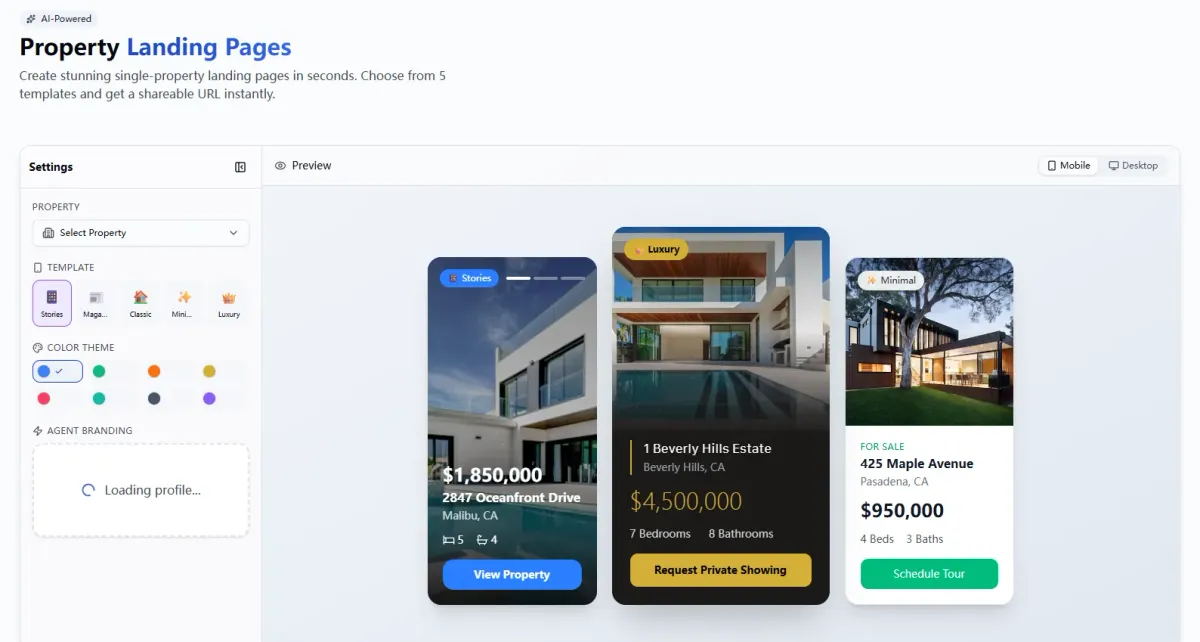
For agents looking for a streamlined, no-cost solution, the EstatePass Property Landing Page generator offers a powerful way to create professional listing sites in minutes.
What It Does:
EstatePass allows you to input property details and media to instantly generate a high-converting, visually appealing landing page hosted on a unique URL. It removes the technical barrier of coding or hiring a web developer.
Inputs Required:
To generate a page, you typically need:
Who It Fits Best:
This tool is ideal for agents who want to promote a "Just Listed" or "Open House" event on social media (Facebook, Instagram, LinkedIn) without sending traffic to a competitor-filled portal like Zillow or Redfin. It keeps the buyer's attention 100% on your listing.
How to Use It: A Step-by-Step Walkthrough
Creating a dedicated site for your listing doesn't have to be complex. Follow these steps to get started:

Alternatives to Dedicated Generators
If you are exploring other ways to build property pages, here are the standard market alternatives:

Best Practices & Common Mistakes
Best Practices for High Conversion:
Common Mistakes to Avoid:
FAQ
1. Do I need to buy a new domain name (like 123MapleSt.com) for every listing?
Not necessarily. While vanity domains look nice on print flyers, for digital sharing (social media/email), a generated sub-domain (e.g., estatepass.ai/123maple) is perfectly effective and free.
2. How does a single property page help with SEO?
It allows you to optimize specific keywords (e.g., "Modern Condo for sale in Austin Downtown") that might get diluted on your main agent website.
3. Can I use these pages for "Coming Soon" listings?
Yes, landing pages are excellent for "Coming Soon" campaigns to build an interest list before the property hits the MLS. (Check your local MLS rules regarding Coming Soon marketing first).
4. How many photos should I upload?
Focus on quality over quantity. 10–15 stunning photos are better than 50 mediocre ones that slow down the page load speed.
5. Is this mobile-friendly?
Most modern generators, including EstatePass, are mobile-responsive by default, meaning they adjust automatically to fit iPhone and Android screens.
6. Where should I share the link?
Share it on your Facebook Business page, Instagram Stories (using the Link sticker), LinkedIn, email newsletters, and even via QR codes on your open house signs.
7. Can I add a pixel for retargeting?
Some advanced or paid tools allow you to add a Meta Pixel or Google Tag. Check the specific tool's features to see if custom code injection is supported.
8. How long does the page stay active?
Usually, you can keep the page active until the home is sold. Once sold, it’s best practice to update the status to "Sold" to show your success to future sellers.
Compliance Note & Disclaimer
Compliance:
Real estate advertising in the U.S. is strictly regulated. Ensure your landing page includes:
Disclaimer:
This guide is for informational purposes only and does not constitute legal, financial, or real estate advice. Tools and regulations change frequently. Always consult with your managing broker or legal counsel regarding advertising compliance in your specific jurisdiction.
Ready to showcase your listing?
Create a professional, high-converting site in minutes with the EstatePass Property Landing Page.
