
In the fast-paced U.S. real estate market of 2026, marketing speed is just as critical as marketing quality. While digital campaigns are essential, the tangible property flyer remains a cornerstone of listing marketing—whether for open houses, yard boxes, or broker caravans. However, spending hours in complex design software is no longer necessary.
This guide explores how free property flyer generators are revolutionizing agent workflows, allowing you to create print-ready and social-media-optimized marketing assets in minutes.
What is a Property Flyer Generator?
A Property Flyer Generator is a specialized software tool designed for real estate agents, transaction coordinators, and brokers to instantly create marketing collateral. Unlike general graphic design tools that require you to build from scratch, these generators use pre-defined templates and automation to arrange property details, photos, and agent branding into a professional format.
Who is this for?
Listing Agents: To quickly generate "Just Listed" or "Open House" sheets.
New Agents: To produce professional branding without hiring a graphic designer.
Real Estate Teams: To maintain brand consistency across all team members’ listings.
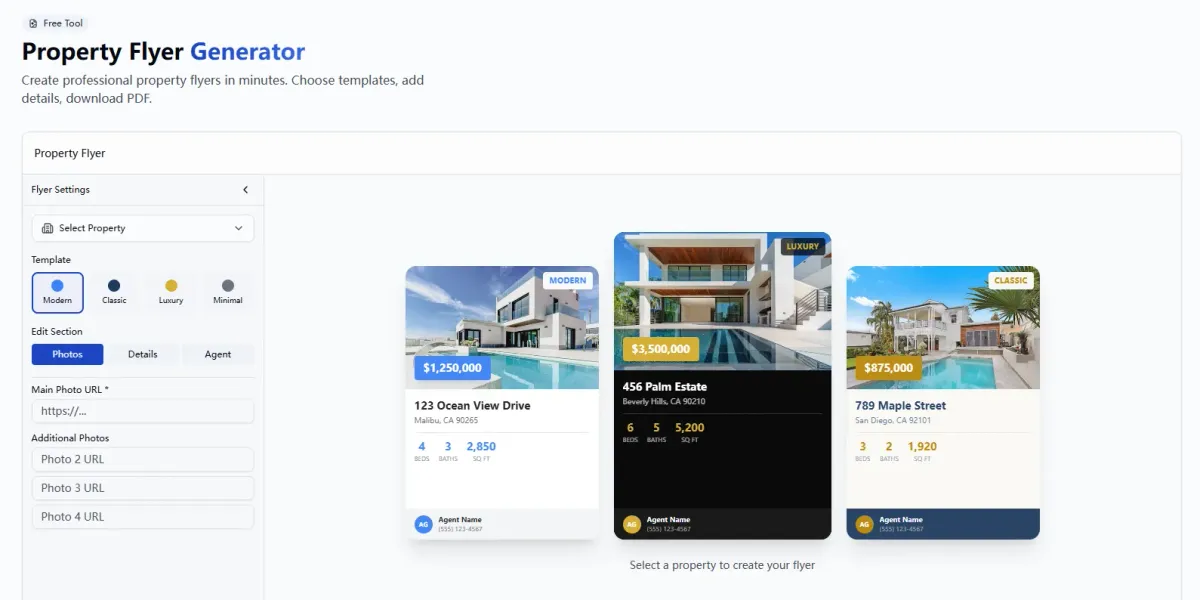
Ease of Use & Speed: Can you generate a flyer in under 5 minutes? The tool should require minimal drag-and-drop actions.
Output Quality: Does it export high-resolution PDFs (300 DPI) for print and optimized JPEGs/PNGs for social media?
Customization: Can you easily change brand colors, headshots, and logos to comply with brokerage identity standards?
Mobile Responsiveness: Can you create or edit the flyer from a smartphone while standing at a property?
AI Integration: Does the tool offer AI assistance for writing listing descriptions or enhancing photo quality?
Template Variety: Are there specific layouts for Open Houses, Just Sold, Price Improvements, and Luxury listings?
Cost Transparency: Is it truly free, or does it watermark the final download unless you pay?
Property Address: For geolocation and mapping features.
High-Res Photos: The tool accepts standard listing photography.
Listing Details: Price, Beds, Baths, Sq Ft.
Description: A short marketing blurb (or bullet points).
Agent Branding: Your headshot, logo, and contact info.
Navigate to the Tool: Go to the EstatePass Property Flyer Generator.
Select a Template: Choose a layout that matches your goal (e.g., "Modern Open House," "Classic Luxury," or "Just Listed").
Input Property Data: Enter the core stats (Price, Address, Bed/Bath count).
Upload Visuals: Drag and drop your primary exterior shot and key interior photos (kitchen, primary bath).
Add Branding: Upload your brokerage logo and agent headshot.
Generate & Download: Click to generate the flyer. Review the preview, then download the print-ready PDF or social media image file.
Pros: Infinite creative freedom; thousands of non-real estate assets.
Cons: Requires manual formatting; easy to "break" the design if you aren't a designer; time-consuming to align text and images perfectly.
Pros: Pulls data directly from the MLS; no manual data entry.
Cons: Templates are often rigid and dated; limited design flair; usually requires a paid CRM subscription.
Pros: Completely bespoke, high-end designs.
Cons: High cost ($50–$200 per flyer); slow turnaround time (24-48 hours); difficult to make quick edits if the price changes.
Pros: Free and already installed on most computers.
Cons: Unprofessional output; print margins are often incorrect; difficult to handle high-resolution images.
Use High-Resolution Images: Blurry photos are the fastest way to lose credibility. Ensure images are at least 1920x1080 pixels.
One Clear Call-to-Action (CTA): Tell the buyer exactly what to do (e.g., "Text 'HOME' to 555-1234" or "Scan QR Code for Virtual Tour").
Highlight Benefits, Not Just Features: Instead of just "New Windows," try "Energy-efficient windows for lower utility bills."
White Space is Your Friend: Do not overcrowd the flyer. Leave breathing room around the text to make it readable.
Too Much Text: Buyers scan flyers; they don't read novels. Keep descriptions under 50 words.
Missing Disclaimers: Failing to include "Information deemed reliable but not guaranteed" can create liability.
Inconsistent Branding: Using different fonts or colors than your brokerage's guidelines dilutes your brand recognition.
Cluttered Layouts: Using 10 tiny photos is less effective than using 3 large, stunning photos.
Always include the Equal Housing Opportunity logo.
Always include your brokerage name and phone number as required by your state’s real estate commission.
Buyer’s Checklist: Evaluating Free Real Estate Flyer Tools
Before selecting a tool, run it through this evaluation checklist to ensure it meets the demands of the 2026 market:
Why EstatePass Property Flyer Generator?
The EstatePass Property Flyer Generator is engineered specifically to bridge the gap between complex design software and simple data entry. It is built for agents who need high-quality results without the learning curve of graphic design platforms.
What It Does
EstatePass automates the design process. It takes raw listing data and transforms it into a polished, persuasive flyer layout. It handles alignment, font pairing, and photo sizing automatically.
Required Inputs
To use the tool effectively, you simply need:
Who It Fits Best
EstatePass is the ideal solution for U.S. residential agents who want to decentralize their marketing. It is perfect for agents who need to get a flyer into a yard sign box immediately after signing a listing agreement, or for teams who want a standardized look without paying for expensive monthly SaaS subscriptions.

How to Use EstatePass to Create Listing Flyers
Creating a flyer is a straightforward process designed to save you time. Follow these steps:
Alternatives to Dedicated Generators
If you are exploring other options, here is how generic alternatives compare to a dedicated generator like EstatePass:
1. General Graphic Design Tools (e.g., Canva, Adobe Express)
2. CRM Integrated Tools (e.g., KVCore, Wise Agent)
3. Professional Designers / Freelancers
4. Spreadsheets / Word Processors
Best Practices and Common Mistakes
To maximize the impact of your flyers, adhere to these design and content principles.
Best Practices
Common Mistakes
Frequently Asked Questions (FAQ)
1. Is the EstatePass Property Flyer Generator mobile-friendly?
Yes, modern generators are designed to work on tablets and smartphones, allowing you to create flyers from your car or an open house.
2. Can I use these flyers for Instagram and Facebook?
Most generators allow you to download a JPEG or PNG version specifically sized for social media feeds, in addition to the print PDF.
3. Do I need copyright permission for the photos?
Yes. You must own the rights to the photos you upload or have permission from the photographer. Do not use images from Google Images.
4. How do I print these flyers?
You can print them on a high-quality office laser printer, or send the PDF file to a local print shop (like FedEx Office or a local independent printer) for glossy cardstock printing.
5. What is the standard size for a real estate flyer?
In the U.S., the standard size is 8.5" x 11" (Letter). Some luxury flyers use 11" x 17" (Tabloid) folded as a brochure.
6. Can I add a QR code?
Yes, adding a QR code that links to a single-property website or a 3D tour is a highly recommended best practice for 2026.
7. Does the tool write the description for me?
Some advanced tools include AI writers. If not, ensure your copy is concise and emotive.
8. Is it compliant with Fair Housing laws?
The tool provides the layout, but you are responsible for the content. Always ensure your text does not violate Fair Housing regulations (see below).
9. Can I save my design for later?
Most web-based tools allow you to download your final product. Some may require a login to save a library of past designs.
10. How much does it cost?
The EstatePass Property Flyer Generator offers free capabilities, while other competitors may charge a monthly subscription for premium templates.
Compliance Note & Disclaimer
Fair Housing & Legal Compliance:
When creating property flyers, U.S. real estate agents must strictly adhere to the Fair Housing Act. Avoid using language that indicates a preference, limitation, or discrimination based on race, color, religion, sex, handicap, familial status, or national origin.
Disclaimer:
This article is for informational purposes only and does not constitute legal, financial, or professional advice. Real estate laws and advertising regulations vary by state. Always verify your marketing materials with your managing broker or legal counsel before distribution.
Ready to create professional marketing materials in minutes?
Try the EstatePass Property Flyer Generator today and elevate your listing presentation.