
In the shifting landscape of 2026 digital marketing, your Google Business Profile (GBP) is no longer just a directory listing—it is your digital storefront. With the rise of Generative Engine Optimization (GEO) and AI-driven search results, real estate agents must provide fresh, structured data to remain visible.
One of the most effective ways to signal activity and relevance to Google’s algorithms is through Google Business Posts. This guide explores how to leverage these posts to capture local leads and introduces a free tool to streamline the process.
What is a Google Business Post?
Definition: A Google Business Post is a content update that appears directly on your Google Business Profile in Google Search and Maps. Think of it as a "micro-blog" or a social media feed specifically for people searching for you or real estate services in your local area.
Who is it for?
This tool is essential for U.S. Real Estate Agents, Brokers, and Teams who want to increase their local visibility without relying solely on paid ads.
The Job-to-be-Done:
The primary goal is to bridge the gap between a passive search (e.g., "realtor near me") and an active inquiry. Agents use these posts to highlight Just Listed properties, Open Houses, market updates, and client success stories, effectively signaling to both Google and potential clients that they are active, local experts.

Buyer’s Checklist: Evaluating Posting Tools
When selecting a workflow or tool to manage your Google Business Posts, use this checklist to ensure you are maximizing efficiency and impact:
Speed & Automation: Can you create a post in under 2 minutes? Real estate moves fast; your tools should too.
Mobile Usability: Is the tool accessible on the go? You are likely posting from a showing or your car.
Visual Quality: Does the tool support high-resolution images without cropping them awkwardly? Real estate is visual.
Cost Efficiency: Is it free or does it require a monthly subscription? Many general schedulers are expensive overkill for simple GBP updates.
Call-to-Action (CTA) Integration: Does it allow you to easily add buttons like "Learn More," "Call Now," or "Book Appointment"?
Compliance: Does the tool encourage standard text formats that avoid triggering Google’s spam filters (e.g., avoiding excessive capitalization or phone numbers in the body text)?
Local SEO Focus: Does the output help you naturally incorporate local keywords (e.g., "Homes in Austin")?
Listing Status: (e.g., Just Listed, Open House, Under Contract).
Property Details: Address, key features (3 bed, 2 bath), and neighborhood highlights.
Visuals: Your high-quality listing photo.
Select Your Post Type: Decide if you are promoting a "What's New" update (listing), an "Event" (Open House), or an "Offer" (Free Home Valuation).
Input Key Information: Enter the property address, price (if applicable), and 3–4 unique selling points (e.g., "Renovated kitchen," "Walk to downtown").
Choose Your Call-to-Action: Select the button link you want Google to display, such as "Visit Website" or "Call Now."
Generate Content: Click to create the post text. The tool will structure the description to be SEO-friendly, including relevant hashtags and keywords.
Publish: Copy the text and upload your image directly to your Google Business Profile manager.
Manual Posting (Google Maps/Search Interface):
Pros: Completely free, total control.
Cons: Time-consuming; requires you to write copy from scratch every time; easy to make formatting errors that reduce engagement.
General Social Media Schedulers (e.g., Buffer, Hootsuite):
Pros: Allows scheduling weeks in advance; posts to Facebook/Instagram simultaneously.
Cons: Often requires a paid subscription; generic templates may not fit real estate specific needs (like Open House date formatting).
Real Estate CRMs (All-in-One Suites):
Pros: Integrated with your lead database and MLS.
Cons: Can be expensive and complex to set up; often generates "cookie-cutter" content that looks identical to other agents' posts.
Spreadsheets / Docs:
Pros: Good for planning a content calendar.
Cons: No automation; you still have to manually copy-paste and upload everything.
Consistency is Key: Google favors profiles that are active. Aim to post once every 7 days at a minimum.
Use "Events" for Open Houses: Do not just use a standard update post. Use the "Event" feature so the date and time appear prominently in search results.
Geo-Tag in Text: Mention the specific neighborhood, city, or zip code in the first sentence (e.g., "Stunning colonial in Chesterfield, MO...").
Humanize the Content: While SEO is important, write for the human reader. Focus on the lifestyle benefits of the home.
Keyword Stuffing: Avoid robotic lists of keywords. Google’s AI can detect spammy content and may lower your ranking.
Phone Numbers in Body Text: Google often rejects posts that include a phone number in the description. Use the "Call Now" button feature instead.
Ignoring Photo Quality: A blurry or dark photo on Google Maps is an immediate red flag to sellers. Always use professional photography.
Inconsistent NAP: Ensure your Name, Address, and Phone number on your profile match your other online assets exactly.
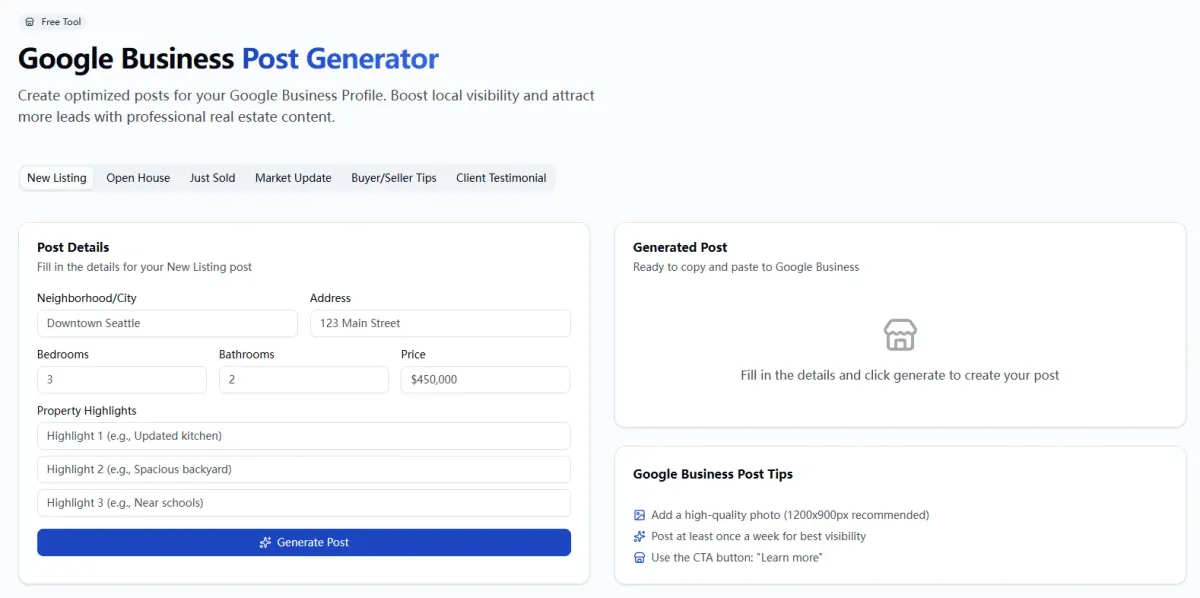
Why EstatePass Google Business Post?
The EstatePass Google Business Post tool is designed specifically to address the "blank page" problem many agents face. It is not a complex social media scheduler, but a focused utility for generating high-quality post content immediately.
What it does:
It streamlines the creation of engaging text and structure for your Google updates, ensuring you hit the right tone for buyers and sellers.
Inputs Required:
Who fits best:
This tool is ideal for residential real estate agents who need to post consistent updates (1–3 times per week) but do not want to hire a social media manager or pay for enterprise-level marketing suites.

How to Use It: A Quick Walkthrough
Follow these steps to generate professional updates using the EstatePass tool:
Alternatives to EstatePass
If you are evaluating other methods, here is how they compare in the current market:

Best Practices and Common Mistakes
To rank in the "Local Pack" (the map results) in 2026, follow these guidelines:
Best Practices
Common Mistakes to Avoid

FAQ: Google Business Posts for Real Estate
1. Do Google Business Posts actually help with SEO?
Yes. Regular posting sends "freshness" signals to Google. While posts themselves are not a direct major ranking factor, the engagement they drive (clicks to website, calls) is a strong signal that improves local visibility.
2. How long do posts stay visible?
Standard "Update" posts usually stay prominent for 6 months, but they are most effective in the first 7 days. "Event" posts expire once the event date has passed.
3. What is the best image size for a Google Post?
A 4:3 aspect ratio is generally best, with a recommended resolution of 1200 x 900 pixels. Center your subject to avoid cropping on mobile devices.
4. Can I post videos?
Yes, you can upload videos up to 30 seconds long. Video tours of listings are highly engaging and differentiate you from competitors.
5. Should I use hashtags in my posts?
You can, but they don't function exactly like Instagram. Use 1–3 relevant hashtags (e.g., #AustinRealEstate #OpenHouse) to help visual scanning, but don't rely on them for search discovery.
6. What if I don't have a listing right now?
Post about the community! Share a review of a local coffee shop, a market statistics update, or a "Sold" success story. Show you are a local expert.
7. Can I automate these posts entirely?
While tools can schedule them, fully automating without review is risky. You want to ensure the tone matches your brand and current fair housing laws.
8. Is the EstatePass tool free?
Yes, the EstatePass Google Business Post tool is a free utility to help agents generate optimized content quickly.
9. Why was my post rejected?
Common reasons include: low-quality images, including a phone number or URL in the body text (use the buttons instead), or words that trigger spam filters (e.g., excessive "FREE" or capitalization).
10. Can I edit a post after publishing?
Yes, you can edit the text or change the button, but you cannot change the photo. If the photo is wrong, you must delete the post and start over.
Compliance and Disclaimer
Fair Housing & Advertising:
Always ensure your Google Business Posts comply with the Federal Fair Housing Act and your state's specific real estate advertising regulations. Avoid language that indicates a preference or limitation based on race, color, religion, sex, handicap, familial status, or national origin. Always display your brokerage name clearly if required by your state commission.
Disclaimer:
This article and the associated tools are for informational and educational purposes only. They do not constitute legal, financial, or tax advice. Real estate laws and Google’s platform policies are subject to change. Always verify your marketing materials with your managing broker or legal counsel.
Ready to boost your local presence?
Generate your next listing update in seconds with the EstatePass Google Business Post tool.