
In the fast-paced U.S. real estate market of 2026, static images are no longer enough to capture attention. Algorithms on Instagram, TikTok, and YouTube prioritize video content, making it essential for agents to pivot from simple photo slideshows to dynamic, engaging video tours.
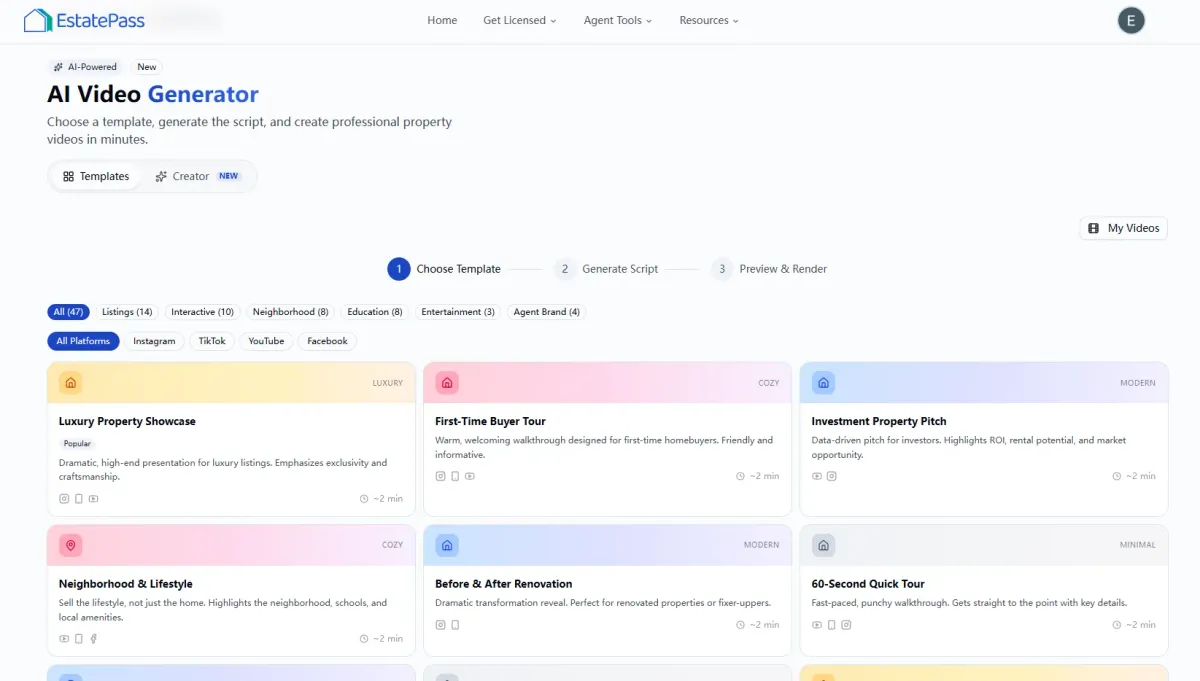
This guide explores the AI Video Maker, a tool designed to automate the video creation process for listings, and reviews EstatePass AI VideoMaker, a free solution tailored for agents who need speed and consistency without the steep learning curve of professional editing software.
What is an AI Video Maker?
Job-to-be-Done: An AI VideoMaker for real estate is a software tool that automatically transforms static property assets—such as listing photos, floor plans, and textual descriptions—into polished, professional marketing videos.
Who It Is For: This tool is designed for residential real estate agents, brokers, and property managers who need to produce high-volume social media content (Reels, TikToks, Shorts) and MLS-compliant video tours quickly. It bridges the gap between expensive professional videography and time-consuming manual editing, allowing agents to market every listing, regardless of price point, with high-quality video.
Real Estate Video Tool Buyer’s Checklist
Before selecting a video generation tool, agents should evaluate platforms based on the following criteria to ensure they meet the specific demands of the U.S. market:
Speed & Automation: Can the tool generate a video in under 5 minutes? Does it auto-sync transitions to music?
Input Flexibility: Does it accept direct photo uploads or require an MLS link? Can it handle high-resolution images without crashing?
Format Versatility: Does it export in both 9:16 (Vertical) for Instagram/TikTok and 16:9 (Horizontal) for YouTube/MLS?
Customization & Branding: Can you overlay your agency logo, headshot, and contact info? Does it allow for custom text overlays (e.g., "Just Listed," "Open House")?
AI Capabilities: Does it offer AI-generated voiceovers or auto-generated captions? Is the AI smart enough to group photos logically (e.g., keeping kitchen shots together)?
Mobile Usability: Is the platform mobile-friendly, allowing you to create videos on the go from your phone?
Cost & Value: Is it a free tool, a pay-per-video model, or a monthly subscription? Are there watermarks on the free version?
Instant Photo-to-Video Conversion: Simply upload your property photos, and the AI sequences them into a cohesive narrative with professional transitions.
Smart Templates: Choose from templates optimized for different vibes—luxury cinematic, fast-paced modern, or cozy residential.
Auto-Branding: The tool allows you to input your agent details once and automatically applies them to the outro or lower-thirds of the video.
Royalty-Free Audio: Includes a library of background music safe for use on social media platforms without triggering copyright strikes.
Upload Assets: Drag and drop your high-resolution listing photos into the EstatePass AI Video Maker. Aim for 10–15 highlights (exterior, kitchen, primary bed/bath, backyard).
Select Style & Format: Choose your desired aspect ratio. Use 9:16 if you are posting to Instagram Reels or TikTok. Use 16:9 for Facebook, LinkedIn, or the MLS. Select a visual style (e.g., "Minimalist" or "Energetic").
Customize Details: Input the property address, price, and key features (e.g., "3 Bed, 2 Bath," "Newly Renovated"). Add your name and license number for compliance.
Generate & Download: Click "Generate." The AI will analyze the images, sync them to the beat of the selected track, and render the video. Preview the result, and if satisfied, download the MP4 file directly to your device.
Pros: Ultimate control over every frame, transition, and sound effect.
Cons: Extremely time-consuming. Requires a steep learning curve to master "beat syncing" and color grading.
Verdict: Best for agents with a creative background who enjoy the editing process.
Pros: Often include advanced features like 3D dollhouse conversions or direct MLS integration that auto-pulls photos.
Cons: Monthly subscriptions can be expensive ($30–$100/month). Some charge extra for high-definition downloads or removal of watermarks.
Verdict: Good for large brokerages with a dedicated marketing budget.
Pros: Free and boosts algorithmic reach slightly by using native features.
Cons: Content is often stuck inside the app (hard to export without watermarks). Limited branding options.
Verdict: Good for quick, casual updates but less professional for a permanent listing video.
The "3-Second Rule": Start your video with the absolute best shot (usually the hero exterior or a stunning kitchen island) to hook the viewer immediately.
Vertical First: In 2026, mobile consumption dominates. Prioritize vertical (9:16) formats for social media.
Audio Matters: Always select music that matches the property type. Classical/Slow for luxury; Lo-fi/Upbeat for starter homes.
Call to Action (CTA): Ensure the video ends with a clear next step, such as "DM for price" or "Link in bio to schedule a tour."
Overloading with Text: Don't cover the beautiful property photos with paragraphs of text. Use short, punchy bullet points (e.g., "Granite Countertops").
Using Low-Res Photos: AI cannot fix blurry images. Always use the highest resolution available.
Ignoring Compliance: Forgetting to include your brokerage name or license number can lead to fines. Ensure your video branding meets your state's advertising laws.

Why EstatePass AI Video Maker?
The EstatePass AI Video Maker creates a streamlined bridge between your listing photos and a viral-ready video. It is built specifically for U.S. agents who need to maintain a consistent brand presence across multiple social media channels.
Key Features & Capabilities:
Who It Fits Best:
This tool is ideal for solo agents and small teams who want to leverage the 2026 trend of short-form video content but lack the budget for a dedicated video editor. It is also perfect for high-volume listing agents who need to tease "Coming Soon" properties before a full professional shoot takes place.

How to Use EstatePass AI Video Maker (Step-by-Step)
Creating a listing video is a simple 4-step process that takes less time than writing a listing description.
Alternatives to EstatePass AI Video Maker
While EstatePass offers a robust free solution, agents often explore other avenues. Here is how generic alternatives compare:
1. Manual Editing Apps (e.g., CapCut, Premiere Rush)
2. Paid Real Estate SaaS Platforms

3. In-App Social Media Tools (Instagram/TikTok Native Editors)
Best Practices & Common Mistakes
To get the most out of your AI-generated videos, follow these 2026 industry standards:
Best Practices

Common Mistakes
Frequently Asked Questions (FAQ)
1. Is EstatePass AI VideoMaker really free?
Yes, the tool is designed to be accessible for agents. It allows you to generate videos without a subscription fee.
2. Can I use these videos on the MLS?
Yes, provided you export in the horizontal (16:9) format and ensure the video does not contain personal branding if your MLS has "unbranded" strictures. Check your local MLS rules first.
3. How many photos should I upload?
For a standard 15-30 second social media reel, 10 to 15 photos are optimal. Too many photos result in cuts that are too fast for the viewer to process.
4. Does the tool add voiceovers?
Some AI tools offer this. Check the current features of EstatePass to see if AI narration is available or if you should add a trending audio track instead.
5. Can I edit the video after it is generated?
The generated file is a standard video format (MP4). You can import it into other apps like Instagram or TikTok to add trending music, stickers, or additional text before posting.
6. Do I own the rights to the video?
Generally, yes. You own the input (photos) and the output (video file) for your marketing use.
7. Will this replace a professional videographer?
For luxury listings ($1M+), a professional videographer is still recommended for lifestyle shots. AI VideoMakers are best for standard residential listings, land, rentals, and maintaining daily social media activity.
8. What is the best video length for 2026?
Data suggests that 15 to 30 seconds is the "sweet spot" for organic social media engagement.
9. Can I upload video clips instead of photos?
Most basic AI makers focus on photo-to-video. Check the EstatePass AI Video Maker interface for current video clip support.
10. How do I remove the watermark?
EstatePass aims to provide clean tools for agents. Refer to the specific export settings on the tool page for watermark details.
Compliance Note & Disclaimer
Compliance: Real estate advertising is heavily regulated in the United States. Ensure all videos generated comply with the Fair Housing Act (avoiding discriminatory language or symbolism) and your state’s specific license law regarding advertising (e.g., prominent display of brokerage name). If posting to the MLS, ensure you use an unbranded version if required.
Disclaimer: This article is for informational purposes only and does not constitute legal, financial, or professional advice. Tool features and availability are subject to change. Always verify local regulations before publishing marketing materials.
Ready to transform your listings into viral content?
Try the tool today: EstatePass AI Video Maker