
For real estate professionals, establishing credibility in a competitive market often boils down to one thing: proof of performance. An Agent Stats Card is a visual marketing tool that consolidates an agent's key performance metrics—such as sales volume, homes sold, and list-to-sale ratios—into a shareable graphic designed for social media and listing presentations. It is specifically built for U.S. real estate agents and teams looking to quickly demonstrate their track record to prospective sellers and buyers without needing complex design software.
Evaluation Criteria: A Buyer’s Checklist
Before selecting a tool to generate your performance metrics or marketing cards, consider these critical factors to ensure the tool fits your workflow:
Accuracy & Data Integrity: Does the tool allow for precise manual entry to match your MLS records, or does it require complex integrations that might sync incorrectly?
Customization: Can you adjust the colors, fonts, and branding elements to match your brokerage’s identity?
Speed & Usability: Can you generate a professional-looking card in under two minutes, or does it require a steep learning curve?
Mobile Optimization: Is the output formatted correctly for mobile-first platforms like Instagram Stories, Reels, and TikTok?
Compliance Features: Does the tool allow space for mandatory disclosures (e.g., DRE license numbers, brokerage logos, and Equal Housing Opportunity icons)?
Cost Efficiency: Is the tool truly free, or does it hide high-resolution downloads behind a paywall?
Visual Appeal: Does the final design look professional and polished, enhancing your personal brand rather than looking like a generic template?
Total Sales Volume: Demonstrates market share and experience.
Units Sold: Shows activity level and transaction frequency.
Average Days on Market (DOM) / List-to-Sale Ratio: Proves efficiency and negotiation skill.
Solo Agents: Who need quick social media content without hiring a graphic designer.
Team Leaders: Who want to showcase collective quarterly performance to recruit new talent.
New Agents: Who want to highlight specific wins (like "100% List Price Received") even if their total volume is growing.
Final Sold Price: The actual price the home closed at.
Original List Price: The price the home was first listed at (not the reduced price).
Divide Sold Price by List Price: $515,000 / $500,000 = 1.03
Multiply by 100: 1.03 * 100 = 103%
Gather Your Data: Log in to your local MLS and run a "Production Report" for the desired time period (e.g., "Q1 2026" or "Year to Date"). Note your Total Volume, Units Sold, and Average Sales Price.
Access the Tool: Navigate to the EstatePass Agent Stats Card.
Input Metrics: Enter your key statistics into the designated fields. You can usually choose which metrics to highlight based on what looks most impressive for your market.
Customize Branding: Upload your headshot and brokerage logo. Select your brand colors to ensure consistency with your other marketing materials.
Review Compliance: Ensure your license number and brokerage name are clearly visible in the text fields provided.
Generate & Download: Click the button to create your card. Download the high-resolution image.
Share: Post directly to Instagram, LinkedIn, or Facebook with a caption interpreting the data for your audience.
General Graphic Design Software:
Pros: Limitless creativity and layout options.
Cons: Requires significant time and design skill; no built-in real estate logic or templates.
Spreadsheet Software (Excel/Google Sheets):
Pros: Great for calculating the numbers and organizing raw data.
Cons: Visually unappealing for marketing; screenshots of spreadsheets rarely perform well on social media.
MLS Built-in Reports:
Pros: 100% accurate data pulled directly from the source.
Cons: Often ugly, cluttered, and branded with the MLS logo rather than the agent's personal brand.
Paid Real Estate CRMs:
Pros: Automated reporting features included in some high-end subscriptions.
Cons: Expensive monthly fees; often overkill if you just need a simple graphic.
Context is King: Don't just post numbers. In your caption, explain why these numbers matter. For example, "Sold in 4 days" means "Less disruption to your life."
Consistency: Post a stats card at the same time every month or quarter. This trains your audience to see you as an active, producing agent.
Highlight the "Why Us": Use the card to differentiate. If you are a buyer's agent, highlight "Offers Accepted on First Try."
Ignoring Compliance: Failing to include your brokerage name or license number (DRE/BRE) can lead to fines. Always check your state's advertising guidelines.
Overcrowding: Trying to fit 10 different stats onto one small mobile card makes it unreadable. Stick to the top 3 metrics.
Using Outdated Photos: Ensure your headshot on the card matches your current appearance to build trust.
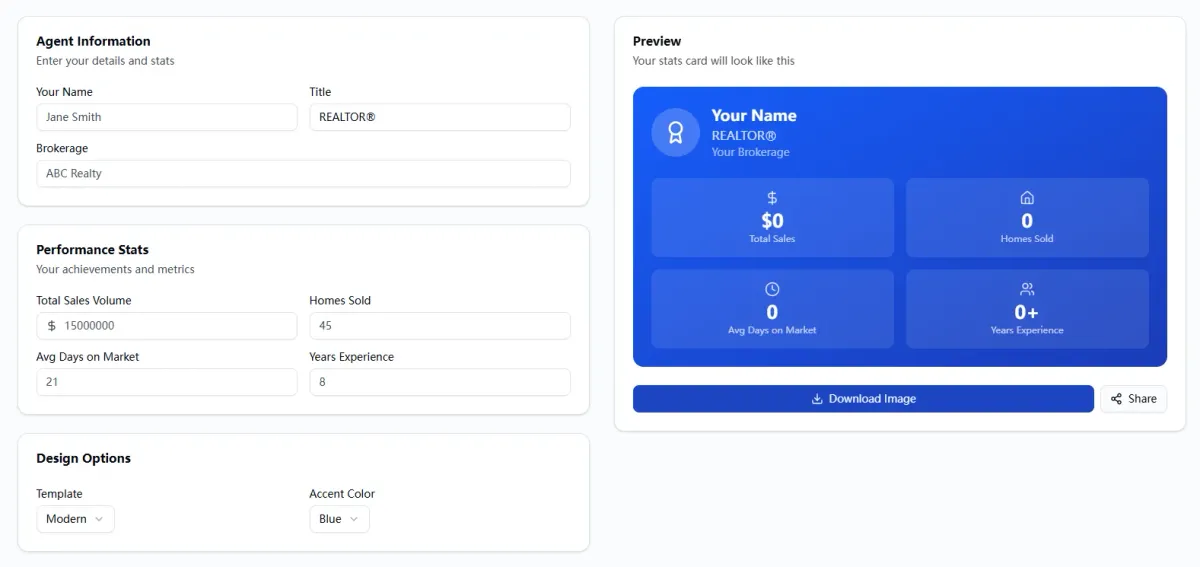
Why EstatePass Agent Stats Card?
The EstatePass Agent Stats Card is designed to bridge the gap between raw MLS data and polished marketing assets. Instead of manually designing graphics every time you close a quarter or a year, this tool streamlines the process.
Core Capabilities
This tool focuses on highlighting the "Big Three" metrics that sellers care about most:
Who It Is For
The Math Behind the Metrics
While the EstatePass Agent Stats Card visualizes your success, knowing how to calculate the core metrics is essential for accuracy. The most persuasive metric on these cards is often the List-to-Sale Price Ratio.
Core Formula: List-to-Sale Price Ratio
This metric tells a seller how close you get to their asking price (or how much you exceed it).
Formula:
$$ \text{List-to-Sale Ratio} = \left( \frac{\text{Final Sold Price}}{\text{Original List Price}} \right) \times 100 $$
Variables:
Worked Example
Imagine you listed a property at $500,000. After effective marketing and negotiation, you closed the deal at $515,000.
Result: Your List-to-Sale Ratio is 103%. Displaying this on your Agent Stats Card signals to sellers that you can potentially earn them more money than the asking price.

How to Use the EstatePass Agent Stats Card
Generating your marketing asset is a straightforward process. Follow these steps to create a card ready for social media:

Alternatives to Dedicated Stats Card Tools
If you are evaluating different ways to visualize your data, here are the common alternatives available in the market:
Best Practices & Common Mistakes
Best Practices
Common Mistakes

Frequently Asked Questions (FAQ)
1. Is the EstatePass Agent Stats Card really free?
Yes, it is a free tool designed to help agents market themselves effectively without upfront costs.
2. Can I use this for my team or just myself?
You can aggregate your team's numbers and upload a team logo to create a "Team Stats Card."
3. How often should I post my agent stats?
Quarterly updates are standard, but monthly updates are excellent for high-volume agents. An "Annual Review" card is essential in January.
4. What if my volume is low?
Focus on quality metrics instead of quantity. Highlight "100% Customer Satisfaction" or "102% List-to-Sale Ratio" rather than total volume.
5. Can I print these cards?
While optimized for digital use (social media/email), the high-resolution files can be used on flyers or listing presentation slides.
6. Do I need to connect my MLS account?
No. This tool usually works with manual input, which protects your privacy and ensures you can verify the numbers before publishing.
7. Is this tool mobile-friendly?
Yes, the output is typically sized for vertical (Stories) or square (Feed) viewing on mobile devices.
8. How do I calculate "Days on Market"?
Most MLS systems provide an average. If calculating manually, count the days from "Active" status to "Pending" status for each sold listing, sum them up, and divide by the number of listings.
9. Can I change the background color?
Yes, customization options allow you to align the card with your brand palette.
10. What is the best format to download?
PNG or JPG is best for social media. PDF is better for email attachments or printing.
11. Does this replace my listing presentation?
No, it supplements it. Use the stats card as a "leave-behind" summary or a slide within your larger presentation.
12. Can I use this for rental listings?
Yes, simply label the metrics appropriately (e.g., "Units Leased" instead of "Units Sold").
Compliance Note & Disclaimer
Compliance: Real estate advertising is strictly regulated in the United States. Ensure that any marketing material generated, including Agent Stats Cards, complies with the Fair Housing Act and your state's real estate commission advertising rules (e.g., clear display of brokerage name, license status, and honest representation of data). Do not misrepresent your production data.
Disclaimer: This guide and the associated tools are for informational and educational purposes only. They do not constitute legal, financial, or tax advice. While the tool assists in visualization, the user is responsible for the accuracy of the data entered and compliance with all local, state, and federal laws.
Ready to showcase your success?
Create your professional marketing asset today with the EstatePass Agent Stats Card.